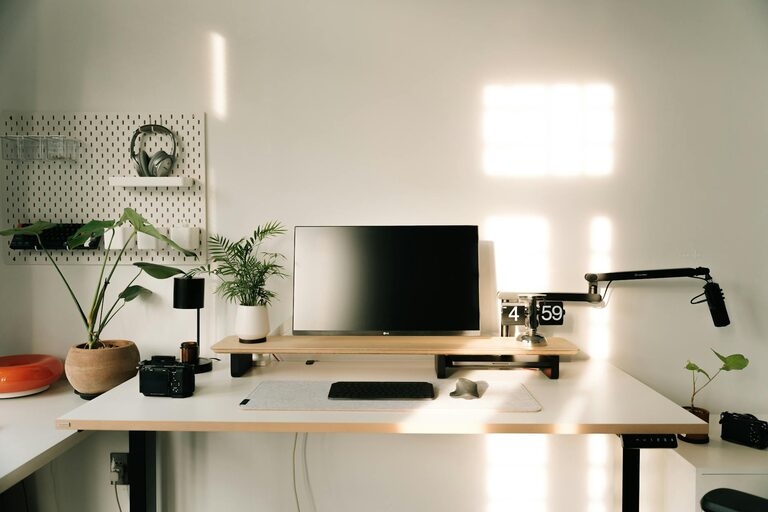



Creating a productive home workspace is essential for anyone working remotely or managing tasks from home. A well-organized area not only helps you stay focused but also reduces stress and improves your overall work performance. Whether you have a dedicated room or a small corner, these tips will guide you in setting up an efficient and comfortable workspace.
Choose the Right Location
Finding the best spot for your home workspace is the first step. Ideally, select an area with minimal distractions, good natural light, and enough space to accommodate your desk and equipment.
– Quiet and Private: Choose a location away from noisy areas like the kitchen or living room.
– Natural Light: Position your desk near windows to take advantage of daylight.
– Space: Ensure you have enough room for your computer, documents, and supplies.
Invest in Comfortable and Functional Furniture
Comfort plays a critical role in maintaining productivity throughout the day. Invest in ergonomic furniture designed for prolonged use.
– Desk: Pick a desk that suits your work needs — consider adjustable standing desks as an option.
– Chair: Choose an ergonomic chair that supports good posture and reduces back strain.
– Storage: Use shelves, filing cabinets, or drawers to keep your workspace tidy and organized.
Organize Your Equipment and Supplies
Having all your tools within reach helps reduce interruptions and keeps your workflow smooth.
– Essential Equipment: Keep your computer, keyboard, mouse, and other tech devices organized.
– Supplies: Store pens, notebooks, chargers, and other supplies in designated containers or organizers.
– Cable Management: Use clips or cable sleeves to keep cords neat and prevent tangles.
Optimize Lighting and Reduce Eye Strain
Proper lighting is crucial for comfort and focus during work sessions.
– Avoid Glare: Position your screen to minimize glare from windows or overhead lights.
– Task Lighting: Use desk lamps with adjustable brightness for focused lighting.
– Screen Settings: Adjust your monitor’s brightness and contrast to suit your environment.
Minimize Distractions and Personalize Wisely
A distraction-free environment helps keep your mind on work tasks but a touch of personalization can make the space inviting.
– Limit Noise: Consider noise-canceling headphones or white noise machines if background sounds are distracting.
– Declutter: Keep only work-related items on your desk to avoid clutter.
– Personal Touches: Add a plant, artwork, or a photo to make your space comfortable without overcrowding.
Establish a Routine and Boundaries
Your physical setup can support mental boundaries between work and home life.
– Set Work Hours: Create consistent work hours and stick to them to maintain balance.
– Clear Start and End: Design rituals like organizing your desk at the beginning and end of the day.
– Break Space: If possible, separate your workspace from rest areas to switch off after work.
Use Technology to Stay Organized
Leverage digital tools and apps to keep track of tasks and appointments.
– Task Management: Use apps like Trello, Asana, or Todoist to plan your day.
– Calendar: Maintain a digital calendar for meetings and deadlines.
– Time Tracking: Consider time management tools to boost productivity and maintain focus.
Regularly Declutter and Refresh Your Workspace
A tidy workspace promotes clear thinking and focus.
– Weekly Clean-Up: Dedicate time each week to organize and clean your desk.
– Review Supplies: Dispose of unused or expired materials.
– Adjust Layout: Occasionally rearrange your setup to maintain comfort and efficiency.
—
Creating an organized and productive home workspace is an ongoing process. By following these tips and tailoring your environment to your needs, you can enjoy a more focused, comfortable, and efficient workday right at home.